Overview of project
Between July 2022 and February 2023, the SSPP TEL team conducted a pilot project to improve the student experience when submitting assignments by creating a special area for students to check the plagiarism/similarity score of their assignments. The goal of the pilot was to make it easier for students with Mitigating Circumstances and the Programme Office staff to manage the process of submitting assignments to KEATS.
Any student who is not subject to Mitigating Circumstances can submit a draft and/or reupload their submission as many times as they wish up to the assessment’s original due date. Many students use this opportunity to submit a draft to check their similarity score before they make their final submission. At the moment, due to technical limitations within KEATS/ Turnitin, students who are granted an extension to an assessment via the Mitigating Circumstances process cannot submit a draft to check their similarity score; they are only allowed to submit once, and after the due date for the assignment passes they no longer have the option to upload their final version.
This is particularly problematic for students who have submitted a draft (sometimes long before the original due date) and then realise they need to apply for Mitigating Circumstances: as they are not able to delete the draft themselves, this draft will be considered their final submission and their MC claim may be rejected on the basis that they have already made a submission. In some departments, PS Staff sometimes agrees to submit and/or delete a draft for a student, but this is time consuming, not consistently applied, and it relies too much on PS Staff being available and inclined to help outside of their normal duties; it is also not sustainable when taking into account the very high number of MC claims we process at the moment.
First Steps
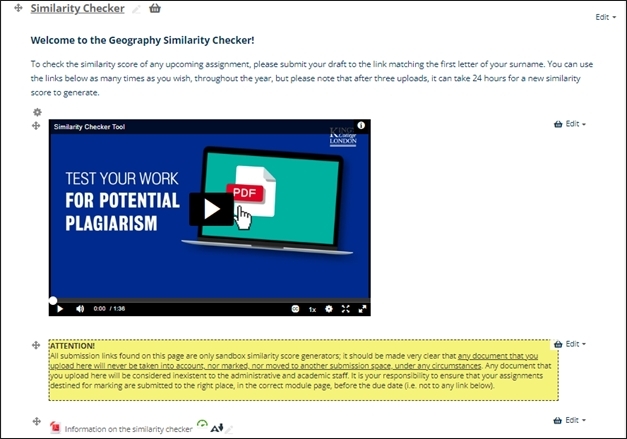
The departments of Geography and Global Health and Social Medicine in the Faculty of SSPP took part in the initial pilot project for their re-sit and dissertation students, and the Similarity Checker (SM) area was created and placed on their Handbook pages on KEATS. Accompanying it was a video and PDF to explain to students how to use the SM, as well as a warning text to reinforce the idea that this did not count as a submission and would not be checked by staff.
Feedback from this small cohort of students led to some revisions and changes to the SM, the most notable of which was around the language used. We had used the words “test area”, meaning to check or trial something, but students for whom English was not their native language found this confusing and equated “test” to mean exam. This was revised and the wording was changed from “test submission area” and “test area” to “Similarity Checker” and “practice area” respectively.
Once we were happy with the revisions, the SM was then rolled out to the rest of the School of Global Affairs, War Studies, and Education, Communication and Society. All Similarity Checker areas have the same layout, same wording and same instructions for parity across all the Schools. Communications for staff and students were also created by Soshana and these were used by Departments to make students and academic staff aware of the existence of the SM.
Layout
The Similarity Checker is made up of several parts. This includes an introductory text explaining what it would be used for, how to use it and a disclaimer that nothing submitted here would ever be moved nor assessed. An explainer video and PDF instructions were added to ensure accessibility and inclusive design were adhered to, so that all students would be able to clearly understand the functionality.
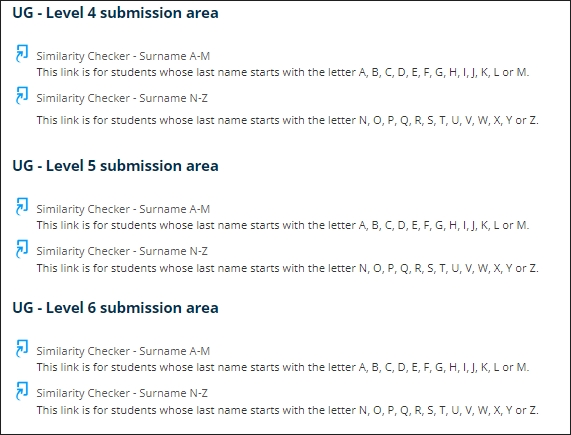
The submission areas were divided by level and surname. There is no functional necessity for this, but it aims to prevent Turnitin from getting overloaded by all students in the one department trying to access it at the same time. If students submit in the wrong area there are no effects on their score or submission.
Student Feedback
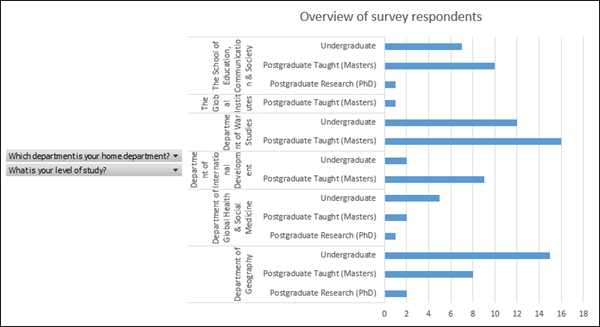
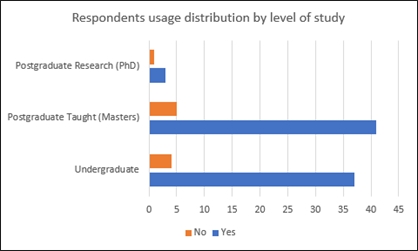
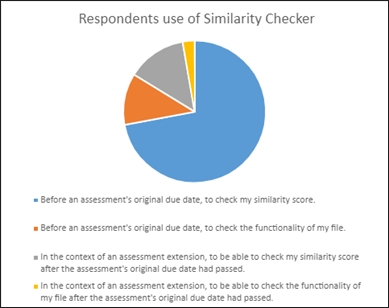
A survey was created by Soshana and shared with all participating Schools, with almost 100 responses. Feedback was generally positive, with students highlighting how the SM improved their experience and confirming that it constitutes an equalising factor for students with extensions. Overall, 90% of respondents have used the SM, 93% found it useful, and 16% used it in the context of an assessment extension (mitigating circumstances).There was also some negative feedback from students who did not find it particularly beneficial, mainly due to the long turnaround time for their score after their third submission, as well as the fact that their score changed repeatedly when uploading a new draft of the same work, depending on how close the assessment due date was. These concerns will be addressed, and elements of response will be provided in future communications.
Conclusion and next steps
The pilot project was a successful start to improving the experience of students and staff using KEATS and Turnitin during their submission period. This was initially to improve the experience of those with Mitigating Circumstances, but we can see that many students without extensions are also using it to check their work.
Next steps will include rolling this out further to other Schools or Departments so that all students in SSPP can access it. Some Departments have their own versions, which we would like to replace with this more modern iteration of the Similarity Checker.
As next steps, the TEL team would like to address some of the points that the students raised as part of the feedback process, and create a communications plan to ensure this is being communicated to students at all relevant points of the academic year.
An all-Faculty stance should also be drawn up if/when a student submits their paper to the Similarity Checker instead of their module page and how this should be dealt with.
Written by Leanne Kelly 
Leanne is the Digital Education Manager for the Faculty of Social Science and Public Policy (SSPP) at King’s College London. She is responsible for a wide range for digital education processes within the Faculty including instructional design, accessibility, training, innovation and developing new online programmes.
She has a background in publishing and eLearning, and is passionate about using technology to improve the learning experience and make it more accessible to all. She is interested in developing new ways of working, scaling projects and reusing content in new ways, and making online learning an enjoyable process for all.
Written by Soshana Fearn
Soshana is the Senior Postgraduate Programme Officer for the Department of Geography (SSPP) at King’s College London. She delivers the day-to-day administration of taught postgraduate programmes (Masters), offers comprehensive and authoritative advice and support for all staff and students in respect of programme regulations and curriculum choices, services the relevant boards and committees, and oversees the processing of Mitigating Circumstances requests.
She has a background in project coordination and is dedicated to improve the experience of both students and staff through the development and implementation of streamlined innovative solutions, including projects related to institutional processes, policymaking and technology-enhanced learning resources.