Stride: With a little help from my editor

In the third part of our series introducing Stride and frame-based editing, we look at the various ways in which the editor can provide you with help in writing your program. If you consider using Stride, it will come handy to know these sources of information.

Stride is implemented in the Greenfoot environment, available from here.

What’s in a symbol? Assignment revisited

I was at a Dagstuhl seminar recently, about programming education, and one of the things we discussed were common misconceptions of novice programmers. One of these, reported by several seasoned programming teachers, was the difficulty in interpreting the assignment symbol in C-style languages:

number = 42

There are several things that can be misinterpreted here. Firstly, the equality operator is non-directional. Some students have problems remembering which way it operates. Consider this statement:

a = b

Which way does it assign? To all of us who have programmed for some time this may seem a silly question – we get used to the right-to-left semantics so thoroughly that we can hardly imagine it to be different. But for beginners? Not so clear. (And, of course, the direction is arbitrary; language designers could just as well have decided the other way.)

The second possible misconception is related to the previously learned meaning of the equals symbol: to express equality. This has been used in maths for centuries, and taught to most pupils before they ever encounter programming, and is quite different from assignment. Consider this code fragment:

a = 0;
b = a;
a = 7;

What, now, is the value of b? For learners holding the equality misconception, it will be 7. This is not entirely unreasonable; it is indeed an internally consistent mental model. The misconception is that variables, once expressed as equal, remain linked. So the equals symbol is interpreted as equality (“b is the same as a“), which might then remain true for the future.

Many people have commented for a long time that the C-style equality-as-assignment is not ideal. Many languages do better. Algol and Pascal, for example, already used a different symbol in the 1960s, quite explicitly to express the directionality more clearly, and to distinguish from equality:

number := 42

I have always like this much better than the single equals and have always been mildly annoyed by the C-style syntax.

So when we designed our language Stride recently, the question surfaced again. What should we choose?

We had two competing goals: On the one hand, we wanted the syntax to be clear and expressive, but on the other hand we want Stride to be a pathway into Java, so there is also a strong incentive to be consistent with Java syntax. (Java, of course, uses the C-style syntax, so these two goals are in conflict.)

At first, we prioritised the Java-compatibility argument and chose the equality symbol. The first release of Stride had this as the assignment operator. But then the Dagstuhl discussion happened, and I started to think again.

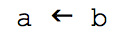
In Stride we have an advantage: Because the representation of the program is not directly typed in, but produced by the system in reaction to command keys, we are not restricted to characters that can easily be typed on a standard keyboard. So initially I considered going back to a syntax that Smalltalk used (in early versions, before it fell back onto the := variant), a left arrow:

arrow-assign


I liked it for its clarity of expression, but it has one disadvantage in a teaching language that is intended to lead to Java and similar languages: it does not directly prepare learners for the equal symbol so widely used for assignment in other languages. After we discussed this in one of our team meetings, Neil Brown, one of our team members, came up with what I think is a brilliant compromise:


This is what assignment now looks like in Stride. The double arrow still has a visual link to an equals sign, but is clearly distinct from it; it is also clearly directional. We still use the equals key as a command key to enter an assignment, further reinforcing the link for the future.

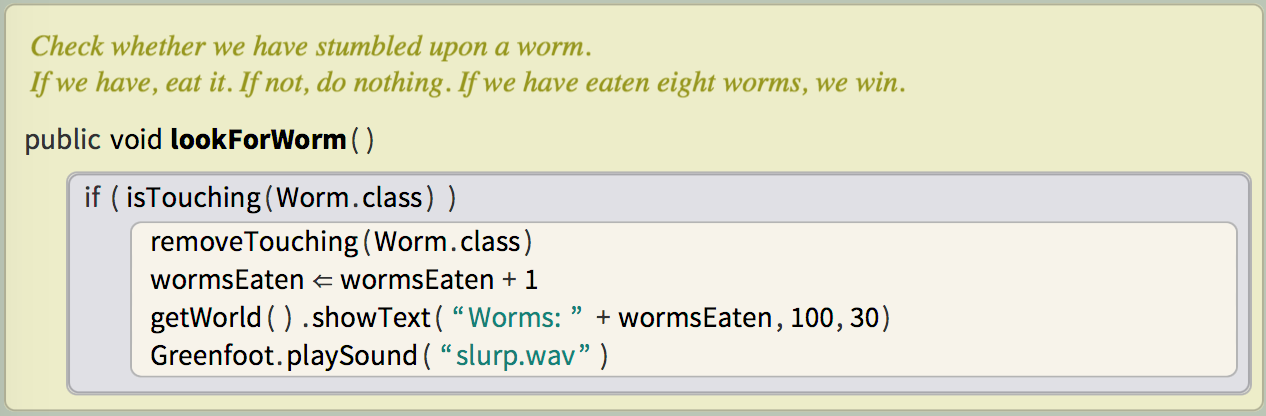
Here’s what our assignment looks like in context:

stride-code


I am very happy with it. I think it reads well and is the closest we can get to reaching two competing goals.

Stride: Creating a game in 7 minutes

This video is mostly for those who want to get a first impression of Greenfoot. We write a simple game in seven minutes (realtime; no cuts!), using Stride. For those who already know Greenfoot with Java: You will see that writing in Stride is not very different to writing in Java. For those new to Greenfoot: This is a quick introduction to Greenfoot and Stride at the same time.

As always, Greenfoot is available for free download.

Stride – A new programming language for beginners

At the Greenfoot headquarters, we – that is: Neil Brown, Amjad Altadmri and myself – have recently worked on creating a new language within the Greenfoot environment: Stride.

The interesting thing about Stride is not so much the language design itself, but its interaction design: editing programs involves different interactions than existing editors.

The goal is that Stride sits halfway between block-based systems (such as Scratch, AppInventor, PencilCode, Alice, etc.) and text-based editors (such as Java or Python), maintaining advantages of both.

I will start a series of posts (text and/or video) here over the next few weeks trying to tell you what Stride is and why you should care. In the meantime, you can get Greenfoot, install it, and have Stride ready to go when the introduction here starts. Stride is built into Greenfoot from version 3 onwards.

Check back soon for the first overview video.

Java 7 for introductory programming — does it make a difference?

The recently released BlueJ 3.0.5 brought full support for Java 7. While it is always good to be up-to-date with the latest versions — what does that actually mean for introductory programming teaching?

Java 7 brought a considerable list of new features to the Java system. Most of them deal with fairly advanced or specialised topics, and will have no influence on introductory teaching with Java. Some, however, will become visible even close to the beginning of programming. Here, I give a short overview of what’s new, and what you — as a teacher of introductory programming — should be aware of.

Java 7 – What’s new

Most of the new features in Java 7 are under the hood or in specialised libraries. These are very unlikely to affect an introductory programming course.

Improvements to the internals of the JDK include changes to the VM to support dynamically typed languages and improvements to the class loader architecture. On the library side, there are new frameworks for concurrency, cryptography and new versions of JDBC and Unicode. All these will not be relevant for most introductory courses.

The two areas that are relevant are “Project Coin”, the code name given to a project defining several small language enhancements, and NIO.2, a new library for I/O. We’ll discuss these in more detail in a moment.

Equally important, what’s not included in this release includes support for closures (known as “Project Lambda”). This would have been the most significant change to Java since the introduction of generics in Java 5 or, arguably, since the original definition of the Java language in 1995. Project Lambda has, however, been deferred to JDK 8 in what’s known as Plan B. JDK 8 is currently scheduled for release in late 2012.

So, which of the new Java 7 features are actually relevant for our intro programming course?

NIO.2

The I/O classes in Java have been improved several times over the years. The release of JDK 1.4 in 2002 brought some significant improvements in the somewhat short-sightedly named NIO library. The naming is rather less than ideal, since it stands for “New I/O”, and the passing of time dictates that everything new will eventually get old.

Which brings us to Java 7 and the New New I/O. So what will this be called now — NNIO? Well, the designers settled on NIO.2.

NIO.2 brings a number of new classes and interface, some with very useful methods. If you are doing any programming that accesses the file system, it’s worth familiarising yourself with these. Particularly interesting are the Files and Paths classes, and the Path interface, which you can find in the java.nio.file package.

All other relevant new features are part of Project Coin. They are diamond notation, strings-in-switch and improved exception handling.

Project Coin

Diamond notation

Generic type details on the right hand side of an assignment can now be inferred. For example, where in Java 6 we had to write

   HashSet<String, Monster> monsters = new HashSet<String, Monster>();

to declare a HashSet variable and initialise it with a fresh HashSet object, in Java 7 we can write

   HashSet<String, Monster> monsters = new HashSet<>();

In other words: We do not have to repeat the generic types of the HashSet on the right hand side, and can instead just write <>. (This syntax is the reason that this construct is known as the “diamond notation”). The effect of this is exactly as the Java 6 version above. It is a purely syntactic shortcut. The compiler will fill in the generic types by copying them from the variable declaration on the left, and all behaves just as before. Of course, the old notation is still allowed.

Strings in switch statements

The variable used in switch statements can now be of type String. For example

   switch (command) {
       case "go":
          goForward();
          break;
       case "help":
          showHelp();
          break;
       default:
          unknownCommand();
          break;
   }

Before Java 7, strings could not be used in switch statements.

Improved exception handling 1: multi-catch

It is now possible to catch multiple exceptions in a single exception handler. For example:

   try {
      file = new File("readme.txt");
      process(file);
   }
   catch (FileNotFoundException | UnsupportedEncodingException ex) {
      ...
   }

As you can see in this example, the catch clause can list multiple types of exception in its header, separated with an OR symbol, to catch any of these types of exception.

Improved exception handling 2: try-with-resources

The second new feature relating to exceptions is called try-with-resources. It solves a hard problem: It was previously surprisingly hard to correctly guarantee that resources (such as files or network connections) were correctly closed in the case of an exception.

The new construct solves this. Look at this example:

   try (FileWriter writer = new FileWriter(filename)) {
      ...
   }
   catch (IOException e) {
      ...
   }

Before Java 7, the standard way to close a resource (a FileWriter in this example) would have been in a finally block, which followed the catch block. In Java 7, the FileWriter is opened in round brackets following the try keyword, marking it as a resource to be auto-closed. Once the try/catch block is completed, the resource will automatically be closed by the Java runtime system.

For classes to be used with the auto-close mechanism, they must implement the new AutoCloseable interface. All the relevant classes in the Java library have been retrofitted to implement this interface.

That already sums up the relevant Java 7 changes. As we can see — not much to worry about here. (This will be different next year, when JDK 8 will bring us closures. I expect we will have to have a lively discussion then about how to treat these in a first-year course. But we can leave that for a while.)

To find out more about the new constructs in Java 7, see this summary. The next version of the Object First book (5th edition, to be released in late October) includes discussion of these new features.


Note: This post was first published in the Blueroom.

Use the Microsoft Kinect with Greenfoot

Those of you who know Greenfoot know that one of its aims is to make programming for beginners exciting and engaging. (Those of my readers who don’t know it should have a look here.)

The most recent addition to Greenfoot is a library that allows programmers to easily use the Microsoft Kinect module with their Greenfoot scenarios. This means that you can now write simple Greenfoot games that are controlled by players body movements.

Probably the easiest way to show what I mean, is to show you what I mean. Here’s a short video:

Programming the Kinect with Greenfoot is probably the easiest way to write programs with the Kinect module. Neil Brown, one of our developers on the Greenfoot team, has adapted open source server software that communicates with the Kinect and designed and implemented a Greenfoot library that makes access surprisingly simple.

If you are interested to try it yourself — here are the detailed instructions. But beware: you might stand in the middle of your room waving your arms around for the next few days! Some people might look at you strangely, but it’s great fun.

Sharing of teaching resources – it’s about people, not about stuff

iconAt the beginning of April this year, we opened a new web site: the Greenroom.

The Greenroom is a web site where teachers who teach with Greenfoot can share resources and have discussions. It was clear for a while that sharing of resources was a powerful thing that was urgently needed for the Greenfoot community. Greenfoot is different from many other environments, teaching with it requires different projects and different ideas, and thus getting started with it, as a new teacher, is challenging. Having a community to talk to, to ask questions, to get ideas, to get tried and tested material, makes a huge difference.

Yet, this is a space where many have failed.

It is often said, with only slight exaggeration, that there are more teaching resource repositories than there are teaching resources. The fact is, countless resource repositories have been created, and most of them have tumbleweed blowing down the main street.

The typical pattern is this: A repository is opened, a flurry of activity follows, resources are submitted (often by the creators and other people personally involved or contacted), and then it dies down. A few months later, little is happening, resources are not maintained, few new resources are added, you can hear the cold wind blowing through empty spaces.

A high profile example is the repository of resources on the ACM SIGCSE website (one of the largest organisations in computer science education). It was – as far as I know – opened in early 2004, and initially attracted a good number of submissions. However, this quickly died down. Looking at the recent submissions, it seems that only four resources were submitted in all of 2008. This went down to three in 2009, with one single submission (so far) in 2010.

Now, I don’t want to pick on that one particular repository specifically. This pattern is not unsusual. I am pointing to it here as a typical example. Making repositories thrive is hard. (We have recently published a paper about this.) So, when we designed the Greenroom, we were very worried about meeting the same fate: spending a whole lot of effort in creating a repository site, only to have it die a slow, quiet death after a few short months.

I am happy to say that we seem to have avoided that fate. The Greenroom is alive and well.

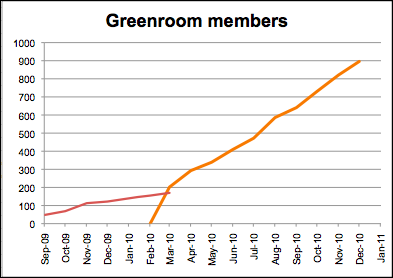
From September 2009 to March 2010, the Greenroom existed as a Google Group. This gave us an excellent discussion forum, and quite poor storage of resources. Over these first six months, about 170 people signed up. Then, at the end of March 2010, we finished our custom implementation of the new Greenroom, and we were amazed at the result: even though only half of the Google Groups subscribers moved over, we surpassed the old subscriber numbers within two weeks, and then they continued to climb. Now, after eight months, we have about 900 people signed up. Lots of resources have been posted, and many interesting discussions are going on.

subscriber graph

Subscriber numbers of the Greenroom; old (red) and new (orange)

So, what makes this site work, when so many others have failed?

I think, in building such a site, you need to address a number of questions:

  • Who is allowed to upload resources? Everyone, or only trusted people?
  • How do you ensure quality? By prior review (work-intensive, hard), or do you let everything in (and risk flooding by poor quality, untried material)?
  • Do you restrict access? (If only teachers can access, you can also post exercises with solutions, exams, etc. But then you need verification.)
  • How do you maintain the resources? Who looks after them?
  • Do you store local copies of resources (which may go out of date) or links to outside resources (which may break)?
  • How do you organise searching and browsing? This requires relating resources to each other – who does that work?

And most importantly:

  • How do you make people come and submit interesting material, and participate in interesting discussions?

I think there are some design choices you can make to address many of these things. As a result, we have built a repository site that is quite different from others. We decided to not use a standard platform (because they only gave us the same old stuff that we didn’t want) and build our own from scratch. The main design choice, which makes most of the difference is this:

The site must be about people, not about stuff.

So we designed a site that is primarily about community, and then about material. There are many design details that embody this idea:

  • The main page of the site shows activities of people, not lists of things.
  • People sign up to the site, and have an ongoing relationship with it. It’s not something where you go once every two years when you redesign your course, it’s a place where interesting things are happening every week or maybe even every day.
  • People sign up with their real names, and are encouraged to post profile pictures. In the Greenroom, you move in a community of peers, not in a big, anonymous black hole.
  • The mental model is that of a staff room in a school, not of a library. It’s about meeting people, not about searching through piles of stuff.
  • Submitting unfinished resources is welcomed. We all know that most things never get finished – submitting something is better than submitting nothing.
  • The resources are owned by the community, not by single people. The edit rights follow a wiki model: everyone can edit everything. (I remember the moment in our design discussions when Neil Brown, one of our team members, suggested this. This changed almost everything. Many of the questions posted above are affected by this. Like many good ideas, it seems obvious in retrospect, but wasn’t at the time.)
  • Small contributions are welcome. Linking some related resources, for example, is a good thing. It’s quick, anyone can do it, and the wiki model allows everyone to do it.

In short: I think people should re-think teaching repository design. It has worked for us. (More details about this are in our paper.) There is daily activity in the Greenroom, many people visit regularly, we have frequent interesting discussion in our forum, and a large number of excellent resources. It has been going much better than we dared to hope.

So, if you think about designing a resource repository, think about the people, not about things. And if you are a teacher interested in Greenfoot, join the Greenroom. There are many friendly people there happy to help.

Comparing Scratch, Alice and Greenfoot

logosAt ITiCSE 2009 and again at SIGCSE 2010, we had panel session: Comparing Alice, Greenfoot and Scratch. The session came about because all three development teams – the Scratch, Alice and Greenfoot teams – were regularly asked one question: What’s the difference?

All three systems aim to let young people learn about programming. Many teachers (as well as parents or kids) have heard of more than one of them, but deciding which one to use can be difficult. While there are clear differences, the time it takes to evaluate all three of them is not trivial.

The panel session turned out to be very popular. The room was packed full, and we got plenty of questions afterwards. So we decided to create a written version of this session. And it’s now available.

We wrote a set of papers, which have now been published in a special issue of the ACM Transactions of Computing Education (TOCE). Each paper was written by a key member of the design team of one of the environments. The papers are more extensive and more in depth than the panel was (we all took the chance to write about various aspects our systems, which we had intended for some time, but never got around to doing), but they also aim to record some of the discussion that we had at the time.

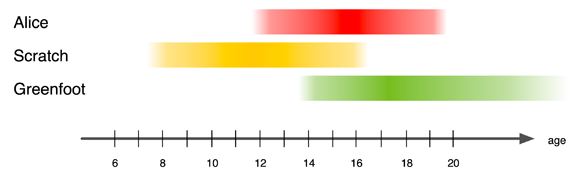
Target age groups for Alice, Scratch and Greenfoot

The TOCE special issue consists of an introduction, three papers (one each) about the three environments, and a discussion section at the end. They are


(NOTE: All papers are available in the ACM digital library. ACM allows authors to also publish the papers on their own web sites. I will link to those freely available copies when they have been made available by the authors. So check back in a little while if you could not get all you were interested in.)